
explainer video script template: problem–solution–proof
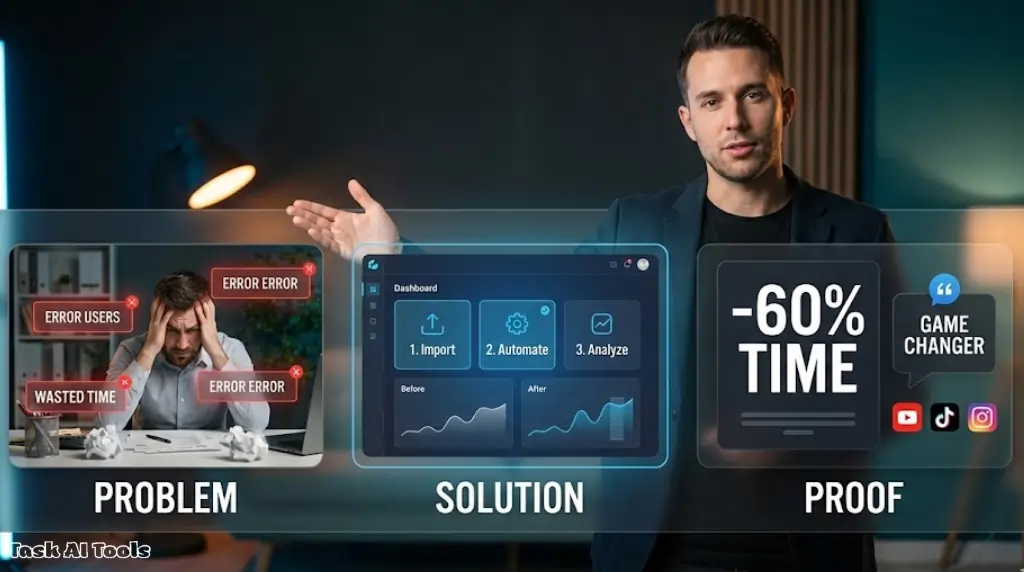
Craft explainers that clarify complex ideas fast. This explainer video script template guides your opening pain point, solution steps, proof assets, and next action. You’ll map narration to visuals and ensure consistent pacing. For tool choices, prompt libraries, and testing methods, our comprehensive AI script generator guide shows a repeatable process from brief to polished delivery.
what an explainer must achieve
An explainer answers three questions fast. what is the pain. how do we fix it. why should I trust this. Keep one audience and one outcome. Remove side quests. If a detail does not move the viewer to the next step, cut it.
timing map for 60–180 seconds
- 0–5s hook State the outcome in plain words. No backstory. Examples save an hour on weekly reports learn a new skill without long courses ship clean invoices with one click
- 5–25s the problem Show the pain with one scene. Use a real task. Name the loss. Time. Money. Stress.
- 25–60s the solution Give a single view of the fix. Show the before. Then show the after. Move slow enough to read but fast enough to keep focus.
- 60–120s how it works Two or three steps only. Each step has one action and one result. Add a short line of narration per step.
- 120–160s proof Pick one proof type. Metric. Quote. Case clip. Short and concrete.
- 160–180s call to action Ask for one next step. Trial. Demo. Guide. Keep the tone friendly.
voiceover beats you can reuse
Keep sentences short. Aim for eight to ten words per line.
- hook Get [benefit] without [common pain].
- transition Right now you lose [time or money] because [reason].
- step 1 Open [feature or step]. It does [result] in seconds.
- step 2 Add [input]. You see [clear outcome] right away.
- step 3 Share or export with [one click action].
- proof Teams like [name or industry] cut [metric] by [number].
- cta Start your free trial today. No credit card.
on screen plan and shot list
You do not need a big crew. Plan a simple mix.
- screen capture for steps
- face to camera for hook and call to action
- cutaway of hands or a whiteboard for rhythm
Use large labels. Keep text under six words. Place captions high so they avoid platform UI. Leave headroom for end cards.
example script 90 seconds
hook 0–5s
Spend less time on reports. Keep clients in the loop.
problem 5–20s
Every week you chase numbers across sheets. You copy. You paste. Something breaks. You start again.
solution 20–35s
With ReportFlow, connect your sources once. It pulls fresh data and builds a clean dashboard.
how it works 35–70s
Step one. Pick the template that matches your client goals.
Step two. Link Google Sheets and your CRM.
Step three. Click generate. You get charts and notes in minutes.
proof 70–85s
Agencies using ReportFlow cut reporting time by 60 percent. Client updates ship on time.
cta 85–90s
Try ReportFlow free. Build your next report today.
Swap the product name and assets. Keep the bones the same.
proof that lands
Pick one style and keep it tight.
- metric numbers that matter to the buyer. time saved. revenue lift. error rate
- quote one sentence from a real user. name and role if allowed
- before after two frames. old flow then new flow. no extra edits
- mini case who. what changed. result. one line each
Do not stack all proof types. One is enough.
storyboard checklist
- frame one shows the win in clear text
- frame two shows the pain with one task
- each step has a cursor or highlight so eyes know where to look
- proof frame has a large number or short quote
- last frame has the call to action and the brand
tone and pacing
Speak like you coach a friend. Use present tense. Avoid buzzwords. Pause for a beat before proof and before the call to action. That small breath helps the message sink in.
pitfalls to avoid
- too many features in one pass
- long intros with company history
- vague claims with no number or name
- heavy music that fights the voice
- captions that repeat the voice line for line
the reusable template sheet
Copy this skeleton and fill the blanks for each project.
title
[product or topic] explainer script
goal
after the video the viewer should [single action]
hook
get [benefit] without [pain]
problem scene
show [task] and the moment it breaks
name the loss [time or money or stress]
solution frame
show [product or method] changing the task
text label [one phrase]
steps
- [action] leads to [result]
- [action] leads to [result]
- [action] leads to [result]
proof
type [metric or quote or case]
detail [number or name]
cta
[trial or demo or guide] with [clear path]
Keep this in a doc. After each release note the metric you care about. watch time. click through. reply rate. tune the hook and the first step first. most gains come from those two edits.
working with clients
Share the script before you record. Ask three questions. did we name the right pain. did we pick the right proof. is the next step realistic. When you agree early the shoot and edit move fast. You deliver on time and keep margins healthy.
You now have a clean template for explainers that respect time and earn trust. If you need to sell a clear offer in a short spot, read the promo video script template for an offer driven structure that converts.
